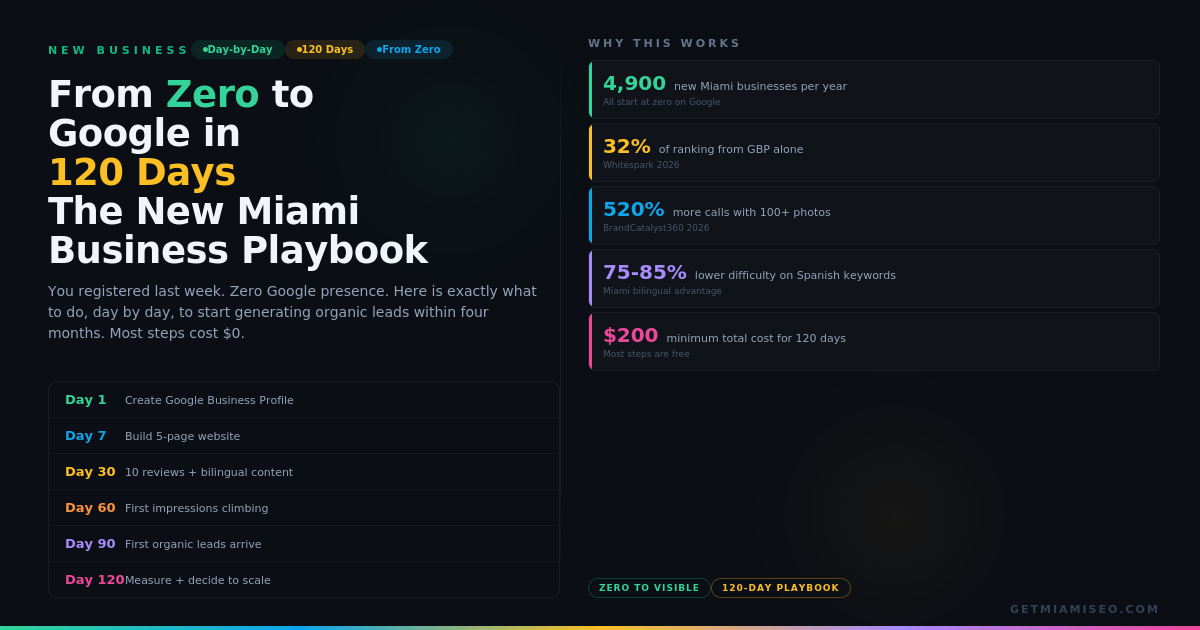
Day 1: Create Your Google Business Profile
This is the single most important action you will take. GBP accounts for 32% of local ranking signals. Nothing else you do today or this week matters more.
Go to business.google.com. Create a new listing. Use your exact legal business name. Do not add keywords to it ("Miami Best Plumber Joe's Plumbing" when your legal name is "Joe's Plumbing LLC" violates Google's guidelines and risks suspension).
Select your primary category. This is the #1 ranking factor for the Local Pack. Choose the most specific option available. "Personal Injury Lawyer" not "Lawyer." "Pediatric Dentist" not "Dentist." "Mexican Restaurant" not "Restaurant." Add up to 10 secondary categories for other services.
Enter your exact address. If you serve customers at their location (plumber, electrician, mobile notary), select "service area business" and define your coverage zone by city or ZIP code.
Add your phone number and website URL. If you do not have a website yet, leave the URL blank for now. You will add it on Day 7-14.
Write your description. 750 characters. Include your primary service, your neighborhood or city, and what makes you different. If you serve bilingual clients, write it in both English and Spanish. Example: "Family dental practice in Coral Gables offering cleanings, fillings, crowns, and pediatric dentistry. Se habla espanol. Accepting new patients with or without insurance."
Upload 15-20 photos. Exterior (so people can find you), interior (so they trust you), team (so they connect with you), and your work or products. Real photos only. Businesses with 100+ photos get 520% more calls. You will not have 100 on day one, but start with 15-20 and add more weekly.
Set your hours. Accurate hours prevent the single most frustrating customer experience: showing up to a closed business.
Verify your listing. Google will ask you to verify by mail, phone, email, or video depending on your business type. Start this process immediately because it can take 5-14 days.
Time: 60-90 minutes. Cost: $0.
Day 2-3: Set Up Your Digital Foundation
Register your business on these platforms today:
Google Business Profile (done). Facebook Business Page. Instagram Business Account. LinkedIn Company Page. Yelp (claim or create). Apple Maps (through Apple Business Connect at business.apple.com).
Each registration takes 10-15 minutes. Use the same exact business name, address, and phone number everywhere. This NAP consistency is critical for Google's entity matching. "123 Main St" on your GBP and "123 Main Street, Suite A" on Yelp confuses Google. Identical everywhere.
Set up Google Analytics 4. Go to analytics.google.com. Create an account. You will connect it to your website when it is built. Having the account ready means conversion tracking starts from the moment your site goes live.
Set up Google Search Console. Go to search.google.com/search-console. This is where you will see how Google discovers your site, what queries you appear for, and how many clicks you receive. Connect it as soon as your website exists.
Time: 90 minutes total. Cost: $0.
Day 7: Build Your Website (or Have It Built)
You need a website. Social media is not a substitute. Instagram is not indexed by Google. A GBP without a website caps your visibility because Google has fewer signals to validate your business.
Minimum viable website: 5 pages.
Page 1: Homepage. Your business name, what you do, who you serve, where you are, and a clear call to action (call, book, visit). Include your primary service keyword and your city in the H1 heading.
Page 2: About. Who you are, when you started, why you started. This is not vanity. It is an E-E-A-T signal that tells Google a real person with real experience runs this business.
Page 3-5: Three individual service pages. Not one page listing all services. Three separate pages, one per service, each targeting its own keyword. A plumber needs "Drain Cleaning Miami," "Water Heater Repair Miami," and "Emergency Plumber Miami" as three separate pages. Each page should be 400-600 words, answer the questions customers ask about that service, and include a CTA.
Technical requirements: Mobile-responsive (63% of local searches happen on mobile). HTTPS enabled (free SSL from most hosts). Fast loading (test at pagespeed.web.dev). Schema markup: add LocalBusiness schema to your homepage with your name, address, phone, hours, and sameAs links to your GBP, Facebook, LinkedIn, and other profiles.
Build options: Squarespace or Wix ($16-33/month, DIY). WordPress with a theme ($50-200 one-time plus hosting). Hire a developer ($500-2,000 for a 5-page site).
Once your website is live, add the URL to your Google Business Profile. Connect Google Analytics 4 and Search Console.
Time: 4-8 hours DIY, or 1-2 weeks with a developer. Cost: $16-2,000 depending on approach.
Day 14: Add Bilingual Content
This step is Miami-specific and most new businesses skip it entirely. That is the opportunity.
35% of Miami searches happen in Spanish. Spanish keywords carry 75-85% lower competition than English equivalents. If you serve any Spanish-speaking clients, bilingual content on Day 14 puts you ahead of competitors who have been in business for years.
On your GBP: Add Spanish service descriptions alongside English. Add at least 3 Q&A entries in Spanish answering common customer questions. Set the "Languages spoken" attribute to include Spanish.
On your website: Build one Spanish-language service page for your highest-demand service. Not a Google Translate copy. Native Spanish. Target "[servicio] + [city]" (example: "plomero Hialeah," "dentista Coral Gables," "contador Miami"). This single page can rank within 30-90 days in markets like Hialeah and Doral where Spanish competition is near zero.
Time: 2-3 hours. Cost: $0 (DIY) or $50-150 (native Spanish writer).
Day 14-30: Generate Your First Reviews
You have zero reviews. Your competitors have 50-200. This gap matters because reviews account for 16-20% of local ranking and 87% of consumers read reviews before choosing.
You cannot wait for reviews to arrive organically. You need to ask.
Start with your first customers. After every service interaction, send a text or email within 2 hours: "Thank you for choosing [business name]. Would you mind leaving a Google Review? It really helps us as a new business. [direct review link]." Generate the direct link from your GBP dashboard under "Ask for reviews."
Ask them to mention specifics. "If you could mention the service we provided and your neighborhood, it helps other customers find us." A review saying "Great plumber in Coral Gables, fixed our water heater same day" gives Google three indexable signals: service (plumber), location (Coral Gables), and specialty (water heater).
If you serve bilingual clients, ask Spanish-speaking customers to review in Spanish. Respond to Spanish reviews in Spanish. Each bilingual review strengthens ranking for queries in that language.
Target: 10 reviews by Day 30. That is one review every two days. In many Miami markets, 10 genuine reviews puts a new business ahead of competitors who stopped generating reviews months ago. Review recency matters more than total count.
Time: 5 minutes per ask. Cost: $0.
Day 30: Checkpoint: What Should Be True by Now
Stop and check. By Day 30, you should have:
A verified, complete Google Business Profile with correct category, 20+ photos, services listed in both languages, and description written. A live website with homepage, about page, and 3 service pages. At least one Spanish-language page if you serve bilingual clients. Google Analytics 4 and Search Console connected. Consistent NAP across GBP, website, Facebook, LinkedIn, Yelp, and Apple Maps. 5-10 Google Reviews with specific service mentions.
Check Google Search Console. Are your pages indexed? Go to "Pages" report. Every page on your site should show as indexed. If pages are not indexed after 2 weeks, submit them manually using the URL Inspection tool.
Check your GBP Insights. How many profile views, search queries, calls, and direction requests did you get this month? This is your baseline. Write these numbers down. You will compare against them every month.
If all items are checked, you are ahead of approximately 80% of new Miami businesses at the 30-day mark. Most never complete this foundation at all.
Day 30-60: Build Content and Authority
The foundation is set. Now build on it.
Publish your first blog post. Choose the question your customers ask most often during consultations. Write the answer as a 600-1,000 word article. Title it as the question: "How Much Does [Service] Cost in Miami?" or "What Should I Look for When Hiring a [Service Provider] in [Neighborhood]?" This is not marketing. This is answering a question that real people type into Google.
Add FAQ schema to your service pages. Write 5 questions and answers per service page, drawn from real customer questions. Add FAQPage schema markup. This makes your answers citable by AI Overviews and eligible for featured snippets.
Start weekly GBP posts. Every Monday, publish a Google Post: a tip, a completed project photo, a seasonal offer, or a customer success story. Alternate English and Spanish if bilingual. Businesses that have not posted in 30+ days see impression drops.
Join your local chamber of commerce. The Coral Gables Chamber, Greater Miami Chamber, Doral Chamber, or neighborhood business association. Membership gets you a directory listing with a backlink to your website. This is your first high-quality local link.
Submit to industry-specific directories. Avvo for lawyers. RealSelf for med spas. Healthgrades for medical. HomeAdvisor for contractors. FindaCPA for accountants. Each listing adds a citation and potential backlink.
Continue generating reviews. Target 5 new reviews per month. By Day 60, you should have 15-20 total.
Day 60: Checkpoint: Leading Indicators
Search Console impressions should be climbing. Even if clicks are low, rising impressions mean Google is starting to show your pages in results. This is the leading indicator that the foundation is working.
Your GBP should be generating activity. Compared to your Day 30 baseline, profile views, search queries, and calls should be higher. If they are flat, check that your GBP is fully complete and that you have been posting weekly.
Your first long-tail rankings may appear. Check Search Console "Performance" report for queries where your site appears. You may be ranking position 20-50 for queries you targeted. That is normal at Day 60. The position will improve as authority builds.
Your Spanish page may already be ranking. In low-competition Miami markets, a Spanish service page can reach page one within 60 days. Check Search Console for Spanish queries like "dentista [city]" or "plomero [neighborhood]."
If impressions are climbing, reviews are accumulating, and your GBP is active, the trajectory is correct. The median SEO campaign breaks even at 7-9 months. You are on schedule.
Day 60-90: Expand and Optimize
Publish 2-3 more blog posts. Each one answers a different customer question. Each one targets a different keyword. Sites publishing 4+ posts per month reach traffic milestones 30% faster.
Add 2 more service pages. Expand from 3 to 5 individual service pages. Each new page is a new ranking opportunity for a new query.
Build your second Spanish page. Target your second-highest-demand service in Spanish. Two Spanish pages put you ahead of most competitors in any Miami neighborhood.
Upload more GBP photos. You should have 50+ photos by Day 90. Include before-and-after project photos, seasonal photos, and team photos. Continue adding 3-5 new photos weekly.
Populate your GBP Q&A. Write the 10 questions customers ask most often and answer them yourself. Add 5 in Spanish. This content feeds directly into AI-generated answers and voice search.
Respond to every review. Reference the specific service and thank by name. A response within 24 hours signals engagement to both Google and future customers.
Day 90: Checkpoint: First Results
By Day 90, you should have measurable results to evaluate.
Reviews: 20-30 total. If you have been asking consistently, this is achievable. Each review strengthens both ranking and conversion.
GBP performance: Calls, direction requests, and website clicks from your GBP should be meaningfully higher than your Day 30 baseline. If your category and neighborhood are not deeply competitive, you may already appear in the Map Pack for some queries.
Search Console: Impressions should be 3-5x your Day 30 baseline. Clicks should be growing. Some queries should show positions in the top 20.
First organic leads. For high-intent local queries ("emergency plumber [neighborhood]," "[service] near me"), you may have received your first calls or form submissions from organic search. Track these using the ROI framework: how many organic leads, at what cost per lead.
If results are tracking: Continue the playbook into Day 90-120 and consider whether professional SEO help would accelerate growth.
If results are flat: Recheck your Scorecard. The category with the lowest score is your bottleneck.
Day 90-120: Compound and Scale
The foundation is built. Now compound it.
Publish a location-specific page for each neighborhood you serve. If you serve Brickell, Wynwood, Coral Gables, and Miami Beach, each gets its own page mentioning the specific neighborhood, landmarks, and customer context. These pages capture "[service] [neighborhood]" searches that generic city-wide pages miss.
Align content to the Miami SEO Calendar. Publish seasonal content 6-8 weeks before the demand spike. A home services business publishing hurricane prep content in April captures June demand. A restaurant publishing Art Basel dining guides in October captures December traffic.
Set up conversion tracking if you have not already. Mark phone call clicks, form submissions, and booking completions as conversion events in GA4. Filter by organic traffic source. This tells you how many leads come from Google versus other channels. Without this, you cannot know whether SEO is working.
Decide whether to bring in professional help. If your business is generating revenue and you want to accelerate organic growth, this is the right time to evaluate SEO agencies. You now have a foundation they can build on, a baseline they can measure against, and enough data to evaluate whether their work is producing results. The first 90 days with an agency will look very different because you already did the foundation yourself.
Day 120: The Measurement That Matters
By Day 120, measure the four numbers that tell you whether the 120 days worked:
1. Organic leads per month. How many calls, form submissions, or bookings came from organic search? If the answer is "I don't know," fix the tracking.
2. GBP actions. How many calls, direction requests, and website clicks from your Google Business Profile per month? Compare to your Day 30 baseline.
3. Search Console clicks. How many organic clicks does your website receive per month? From which queries?
4. Review count and velocity. How many reviews do you have? How many new ones per month? Are customers mentioning specific services?
These four numbers are your baseline. Track them monthly. A rising trajectory means the playbook is working and investment should continue. A flat trajectory means something is broken and the Scorecard will tell you what.
What This Playbook Costs
TimelineActionsCostDay 1-3GBP, social profiles, analytics setup$0Day 7-14Website (5 pages)$0-2,000Day 14Bilingual content$0-150Day 14-120Content creation (DIY)$0Day 30Chamber of commerce membership$200-500/yearDay 14-120Review generation$0Day 30-120Weekly GBP posts$0Total120 days of foundation$200-2,650
Everything except the website and chamber membership is free. The most expensive part is your time: approximately 2-4 hours per week for 120 days. The return, based on industry data: SEO delivers a median ROI of 748% and generates leads at $31 versus $181 for PPC.
FAQs: New Business SEO
Can I skip straight to Google Ads? You can, but you will pay 5.8x more per lead than organic search delivers. Ads are a complement, not a replacement. Build the free organic foundation first, then add ads for immediate demand while organic compounds.
What if I am in a very competitive industry? The 120-day playbook still applies. The difference is that competitive industries (law, real estate, medical) take longer to rank for head terms. Start with long-tail and neighborhood-specific keywords where competition is lower, and build toward the competitive terms over 6-12 months.
Should I worry about AI search as a new business? Not in the first 60 days. Focus on GBP, website, and reviews first. After Day 60, the FAQ schema and direct-answer content you build will naturally make your business citable by AI systems. Entity recognition builds automatically as your signals accumulate.
How many blog posts do I need? Quality over quantity. One thorough post answering a real customer question outranks ten thin posts. Aim for 1-2 posts per month in the first 120 days. Scale up after the foundation is solid.
What if I do not speak Spanish? Hire a native Spanish speaker to write one service page ($50-150). The ROI of one Spanish page in Miami can exceed the cost within the first month of ranking.
When do I need an SEO agency? After Day 60-90, when the foundation is built and you need: technical implementation (advanced schema, site architecture), content at scale (4+ posts per month), link building beyond chamber memberships, or competitive strategy in crowded markets. The pricing guide covers what professional SEO costs.
What mistakes should I avoid? Do not buy fake reviews. Do not stuff keywords into your GBP business name. Do not build a one-page website with all services listed together. Do not ignore Spanish. Do not judge results at Day 30. The 100 Myths article covers every misconception that costs new businesses money.
The Difference Between Invisible and Found
Every business in Miami started at zero. The ones you find on Google today were not born there. They built their way there through the same sequence: claim the profile, build the site, generate the reviews, publish the content, earn the links.
The difference between the business that is found on Google at month four and the one that is still invisible at month twelve is not budget, talent, or luck. It is execution. The playbook above costs under $2,650 and 2-4 hours per week. It uses the same tools and techniques that established businesses with 5-year head starts use. The advantage they have is time. The advantage you have is that you are starting with the 2026 playbook while they are still running the 2020 one.
Your business exists. Make sure Google knows.
Need help building your first 120 days? Let's map it together ->